
Click on  to define the wind standard and the terrain parameters. The following dialogue appears:
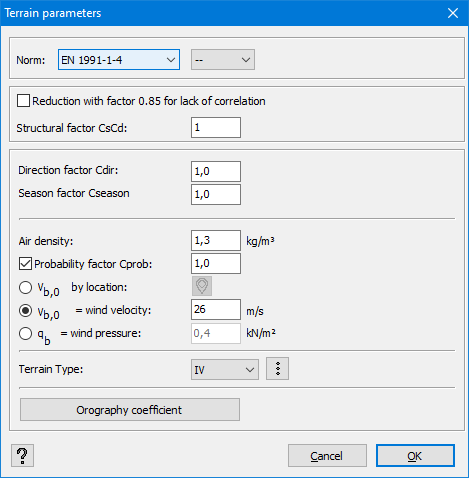
- Standard
Select the standard and national annex according to which you would like to generate the wind loads.
A full list of available standards in Diamonds can be found here.
The following explanation refers to EN 1991-1-4.
- Structure parameters
- Indicate if you wish to take the lack of correlation between the wind on the façades into account or not. If you check this option, the wind loads on the façades will be multiplied by a factor 0,85. This reduction is not allowed in every national annex and therefore only available in the relevant national annex.
- the value of the structural factor cscd.
It takes into account effects due to non-simultaneity of the extreme thrust on the entire surface cs as well as the risk of vibrations due to turbulence cd.
- Direction and season factor
Enter the wind direction factor cdir and the season factor cseason.
Both will be multiplied by the basic reference wind velocity vb,0.
- Windvelocity
- the air density (mostly 1,25kg/m³)
- the probability factor cprob that takes the design life time of the structure into account. When the design life time is <50 years, the probability factor will be <1. You can set the design life time the in window with the load groups (see the Consequence class and Design lifetime).
- either you define the basic reference wind velocity vb,0 [m/s] so that Diamonds can calculate the extreme wind pressure qp(z) using the other parameters (like cdir, cseason, the terrain type, the slope, …). You can also let calculate the basic reference wind velocity for you by selecting the correct country and wind area via the pull down-menu/ the button
 .
. - either you define the reference wind pressure qb so that Diamonds can calculate the extreme wind pressure qp(z) using the other parameters (like cdir, cseason, the terrain type, the slope, …).
- Terrain type
Determine the terrain type (0 to IV). Click on to consult the meaning of each category.

- Slope
If the building is situated on a slope, it is possible to take it into account with the help of the orographic coefficient c0(z). You can either insert the incline percentage and the s-factor, or you can have it calculated by Diamonds.
Click on . The following dialogue appears:
If the building is situated in the proximity of a plateau, the first option is applied. If the building is situated on a hill, the second option prevails. All dimensions can be correctly inserted with the help of a detailed drawing.
Remarks:
- The standard and terrain parameters can be asked in the report manager
 .
. - Adjusting the standard or the terrain parameters causes previously generated wind loads to be removed!
