
To generate wind loads on a frame/ canopy roof:
- Enter the terrain parameters
 .
. - Select a frame / canopy and click on
 .
.
The selected bars have to lie in the same plane.
In the dialogue that appears you can check an option for canopy roofs.
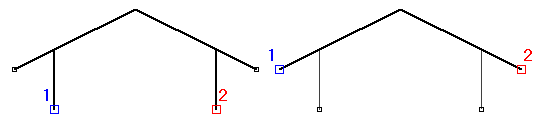
| For frames | For canopy roofs |
|---|---|
 |  |
- Diamonds automatically searches the contour of the selected structure, which is shown in black. Based on this contour, Diamonds calculates the wind load on all vertical, horizontal and oblique bars.
The points 1 & 2 indicate the start and end point of the contour. They can be moved with the left and right mouse button respectively.
- Geometry
Enter the total depth of the construction and the position of the selected frame/canopy in relation to the front and the frame before and behind.
The figure on the right shows a top view of the building for which you’re generating the wind loads.- The frame you’ve selected is drawn in bolt.
- The frames in front and behind are drawn using a dotted line.
- The total length of the plan view equals the distance you imposed with “Total depths of the structure”.
This way, Diamonds can correctly calculate the exterior pressure coefficient cpe which varies according to the depth of the construction.
- Select in the different cases for which wind load should be generated and in which load group they should be placed.
You can generate 24 different wind loads. This document describes how we get to these 24 cases and which ones you should choose. - Although the wind generator can only be applied on a 2D frame, the generator has a 3D character. In particular, when considering a direction of the determined wind, the pressure or suction at the surfaces parallel to the direction of the wind will also be taken into account. For example, if the wind blows from the left to the right (thus, parallel to the frame), a suction force is also applied on the two exterior walls. Moreover, if a wind load is applied on the exterior wall, it is also necessary to consider the pressure and suction forces applied on other frames. It is worth considering all the load cases, regardless of the position of the frame in question.
A frame located on the front or back edge of the construction will sustain not only a wind load in an X plane but also a pressure or suction along the plane. As, in many cases, all the bars of the exterior wall are not intended to be charged with wind, in the second tab you can unselect the bars that will not take wind loads.

- The internal pressure coefficient cpi depends on the size and distribution of openings. To have Diamonds calculate the internal pressure coefficients, click on
 . The following dialogue appears:
In the case of a construction with vertical walls, cpi is calculated based on the permanent and temporary openings in the building.
At the bottom, you will find the boundaries within which cpi is situated according to the direction of the wind. You should select the value of cpi to be used. You can also insert a custom value in a suitable field.
When it is impossible to determine the distribution and/or size of the openings, you may use the least favourable of the two following values for cpi: +0,2 and -0,3.
The internal pressure coefficient is not relevant for canopy roofs.
