
In this dialogue  you define the following for each load case or for each of the sub load cases:

- Shape of the wave
 Sinus (or harmonic)
  Square (or impulse)
 Sawtooth (or triangle or ramp)
 Arbitrary (see further)
- Amplitude factor: this is the maximum value of the wave, this is also the multiplication factor for the static load. The amplitude has to be in the range -1 and 1.
- Amplitude 2 (only for square or sawtooth): this is the maximum downwards value.
- N° period : with this option you specify how many times the cycle should run within 1 period.
- Phase (only for harmonic): to define a phase shift.
- ‘Start’: this is the start point of the wave, relative with respect to the period (start time = start * period). This value is always between 0 and 1. If this value is 0, the wave starts at the beginning of the period. In case of a value > 0, the wave will start later, there is a part of the period where the amplitude is 0 (a so called ‘dead’ part)
- Step (only for square or sawtooth): this is where the wave crosses the horizontal axis, so where the wave changes sign, the zero point of the wave.
- ‘End’: this is the end point of the wave, relative with respect to the period (end time = end * period). This value is always between 0 and 1. If this value is 1, the wave finishes at the end of the period. In case of a value < 1, the wave will end earlier, there is a part of the period where the amplitude is 0 (a so called ‘dead’ part).
Finally you indicate whether the wave must be applied to the (static) loads of the load case or as an acceleration of the supports. For this last option, you enter the value of the acceleration and the direction with the angles α and β.
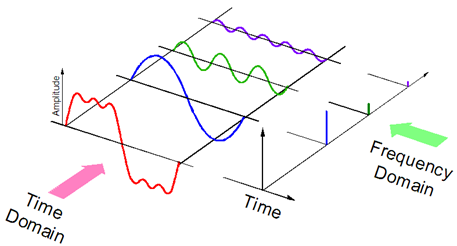
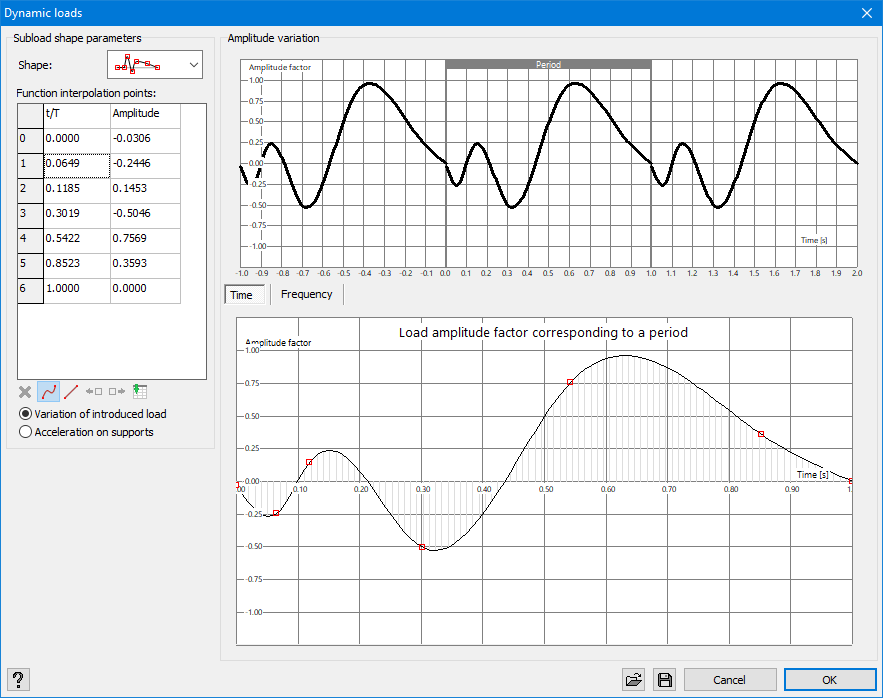
On the right hand side, you will see the shape of the wave and a detail over 1 period. In the detail, you will have the possibility to show the wave in the (classic) time domain or in the frequency domain. By means of a Fourier transformation, every arbitrary wave (in red) can be described as a sum of harmonic (sinus and cosinus) functions (in red, green and purple). This decomposition can be displayed in the frequency domain. Here you can see which frequencies with which amplitude occur most in the wave. The frequencies with the highest amplitude will be most determinative and can be even critical, especially when they correspond with the eigen frequency of the structure.
Arbitrary wave
You can define an arbitrary wave in Diamonds. On selecting this option, you need to fill out some interpolation points. You can use the built-in Diamonds tools or past an external table with values.
 deletes a point
  ‘fluent’ interpolation between points. The points are being connected through a cubic spline.
 linear interpolation between points. The points are being connected through straight.
 adds a point, before the current and half way with the previous one.
 adds a point, after the current and half way with the next one.
 pastes an external table with value from the clipboard. In an external table (for example MS Excel), you need to have 2 columns: one with the time/ period values and a second one with the amplitudes. Select both columns with values and copy these to the clipboard (via CTRL + C) and paste the values in Diamonds with .
Next to these tabular operations, you can also pick points with the cursor in the detailed graph and move them.
