
To define a fire curve:
- Click on
 . The following dialogue appears:

From the pull down list on the left top, choose between a number of predefined fire curves (see EN 1991-1-2 §3.2), namely:
- The standard fire curve (ISO 834)
- External fire curve
- Hydrocarbon fire curve
- User-defined fire curve
- Click on
 . This dialogue appears: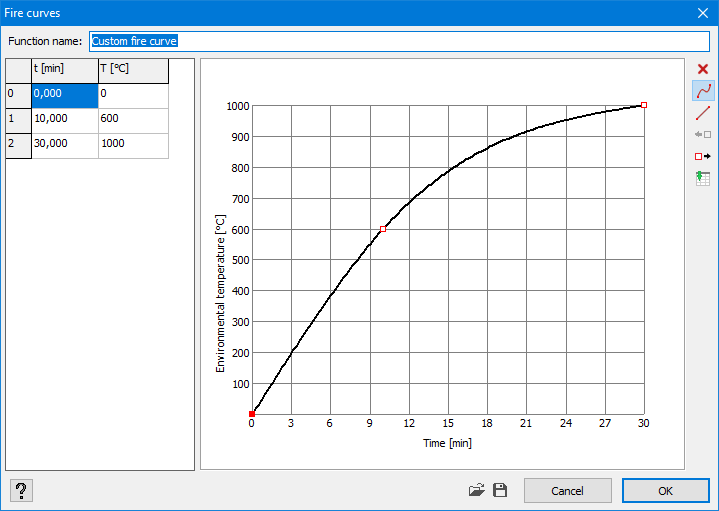
- Name the fire curve.
- Define the function by dragging the red points to their correct position.
 deletes a point
 ‘fluent’ interpolation between points. The points are being connected through a cubic spline.
 linear interpolation between points. The points are being connected through straight.
 adds a point before the current and half way with the previous one.
 adds a point after the current and half way with the next one.
 pastes an external table with value from the clipboard. In an external table (for example MS Excel), you need to have 2 columns: one with the time values and a second one with the temperatures. Select both columns with values and copy these to the clipboard (via CTRL+ C ) and paste the values in Diamonds with .
- With the buttons
 and
and  you can import or export a fire curve.
 - Click
 to remove a self-defined fire curve.
 - Click
 to edit a self-defined fire curve.
- Click on
Enter the required fire resistance [min].
Notes:
- Click on
 to remove the fire curve from the selected bars.
 - A fire curve on bar without a cross-section or material has no meaning.
- A fire curve can only act on bars, not on plates.
- A fire curve and fire resistance [min] are linked to one or more bars, not to the project.
So, one project can contain multiple bars that are subject to different fire curves and require different fire resistances.
More background information on the calculations and practical examples, can be found here.
