
To design a steel connection:
- Do a steel verification
 .
.
Check the strength, stability and stiffness of the structure. It has no use to design connections ( = a detail) in an insufficient structure. - Select the elements for which you want to design the connection(s).

- Click
 or go to the menu ‘Analyze – Connection Design’.
When Diamonds recognizes a connection configuration, it automatically opens a dialogue showing different interpretations of the selection.
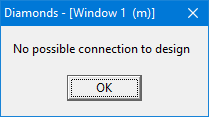
If it cannot establish a correlation with known connections, it indicates that the connection cannot be verified with the use of PowerConnect.
This article explains why not all connections can be designed using PowerConnect and which can be designed. - The numbers written over the connections, are the bar numbers. They allow you to select the correct interpretation.
- The next steps are explained in the next paragraph.
