
To apply a load on a surface:
- Select the relevant elements.
- Click on
 .
.
The following dialogue appears:
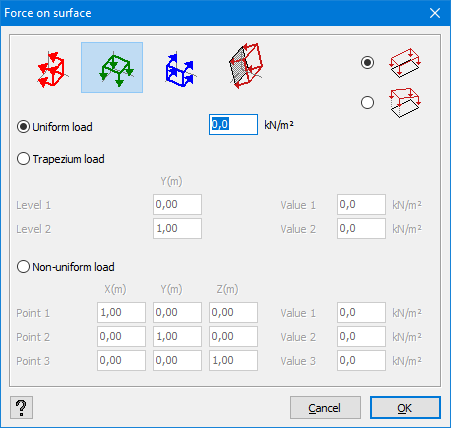
- Direction
A surface load can be applied:- according to the global X, Y or Z direction
 .
.
Specify if the value is a value per m² of the surface or per m² of the horizontal projected surface
  .
.
- or according to the local coordinate system
 of the surface.
This option will always result in a load perpendicular to a selected surface.
- according to the global X, Y or Z direction
The small arrows indicate the direction of a positive load.
- Size
Diamonds distinguishes 3 scenarios:- Uniform
This results in the same load over the entire surface. It is enough to indicate a single value for the magnitude of the load. - Trapezium
This option results in a load linearly varying depending on the height. Therefor it can only be applied to (inclined) walls. Not on slabs.
Specify a value of the load for two specific levels.
A practical example of this feature is applying water & soil pressures. - Non-uniform
For a non-uniform load, you have to define the magnitude of the load for three independent points. You can indicate the coordinates of the points graphically in the drawing area of Diamonds (while this dialogue is open).
- Uniform
| Uniform | Trapezium | Non-uniform |
|---|---|---|
 |  |  |
