
What is Lexi?
“Lexi” is the AI chatbot included from Diamonds 2026 onwards. It is built by BuildSoft and allows you to ask product related questions directly from the Diamonds interface.
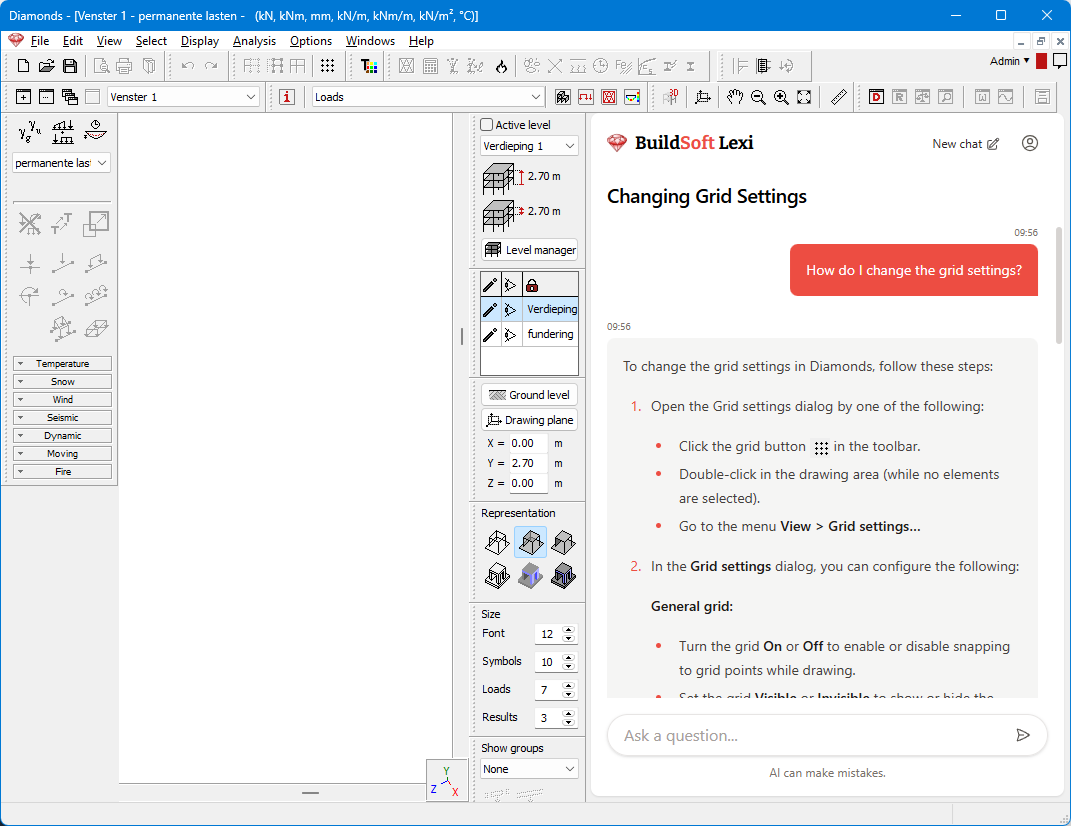
How can Lexi help you?
Lexi is at its strongest when it comes to product-related questions about Diamonds: settings, workflows, where to find something, step-by-step instructions, explanations of features, and so on.
Lexi is not a replacement for engineering judgement. You cannot ask it to interpret a standard (e.g. Eurocode) or debate whether element X complies or not. Lexi is also not capable of looking “inside” your model or results.
The table below clarifies the types of questions that Lexi can and cannot answer.
| What Lexi CAN help with? | What Lexi CAN’T help you with? |
|---|---|
| “How do I change the grid settings?” “What’s new in Diamonds 2026?” “How do I use eccentricities?” “What does error message Z mean?” | “How can I improve the results?” “Is this the best option for this model?” “Is the deformation sufficient according to Eurocode?” “Is bar 15 in concrete?” |
Good practice when using Lexi
- Lexi is trained on our English knowledge base. When you ask questions in another language, Lexi “thinks” in English. At the end of the AI process, the answer is translated into the language in which you asked the question. That answer may contain translation errors. You will get the best answers when using the English language.
- Within a conversation, you can ask Lexi multiple questions on the same topic. If you want to ask questions on a completely different topic, start a new chat.

User settings in Lexi
You can access the users settings by clicking on the icon  . In the menu that appears, you see three sections: credits, history and settings.

- Credits
Users with a valid Diamonds licence can use Lexi. However, to avoid overloading the server, the number of questions is limited.
The ‘credits’ bar visually shows how far you are from the limit and when your credits will be restored. - History
- If you click on ‘History’, you can consult all the questions you ever asked Lexi. These questions are stored locally on your computer – not on a server, nor in the cloud. The content of the questions is only shared with us when you give permission (see further).
- Click on the icon
 behind a question to remove it from the list (and by consequence also your computer).

- Settings (for privacy)
You decide which data you share with us to improve Lexi.
The table below compares the three privacy settings. For clarity: data is only shared with us when you provide feedback, meaning giving a👍 or 👎.
| Which data? | Privacy settings of Lexi | ||
|---|---|---|---|
| Disable data retention | Minimal data | Full data | |
| Feedback (👍 or 👎) | Not possible to give feedback | Yes | Yes |
| Comment | Not applicable, as data is only sent when you give feedback | Not possible to add comments | Yes |
| Title of the conversation with Lexi | Yes | Yes | |
| Content of the conversation with Lexi | No | Yes | |
| Personal data (name, email, phone number, licence number, etc.) included in your conversation with Lexi | Only anonymised feedback is shared with us. We have no way of identifying your personal data and therefore cannot contact you. If you wish to contact support, please email or call us. | ||
| Your model (*.bsf) | Lexi does not access your model or its results. It will therefore never share your model with us. If you are unable to resolve a model-related question, please email your model (*.bsf) to support@buildsoft.eu | ||
How can I hide/ disable Lexi?
To hide Lexi:
- Go to the menu Windows > Toolbars > uncheck the option Lexi.
- If you restart Diamonds, this will turn off Lexi completely.
To show Lexi again:
- Go to the menu Windows > Toolbars > check the option Lexi.

