
The button  allows you to generate wind loads from left to right and vice versa. Above that, Eurocode states that for the same wind direction, sometimes both upward and downward wind pressure should be considered. It’s logical that a structure should be able to bear all the different cases.
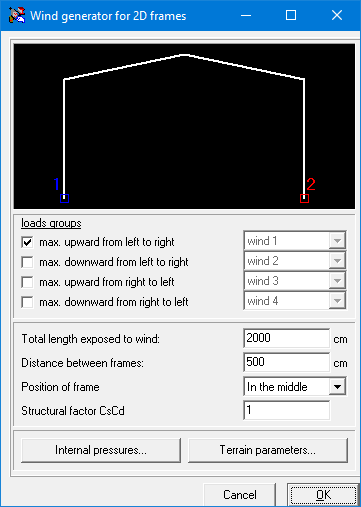
Wind load generator on 2D frames:
- The upper (black) part of this dialog shows an image of the structure.
1•2•Build will automatically search the circumference on which wind loads will be applied. This is the path between points 1 and 2. You can move points 1 and 2 by using the left and right mouse button respectively. - In the second part of this dialog, you must indicate for which load cases you want to generate the wind loads.
- Below that, you must enter the geometry data of the structure:
- The total length of the building.
- The distance between the frames
- The position of the frame within the building (front or middle frame)
- The structural factor
- At the bottom there are two buttons: one to define the internal pressure coefficients and one for the terrain parameters.
