
When you open the wind generator  and click on the button ‘Terrain parameters’, the following dialogue appears:
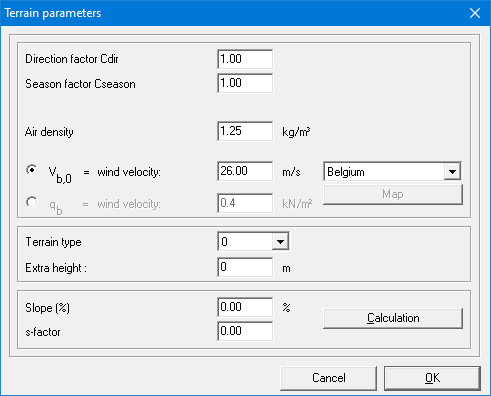
In the first part of this dialogue, you either define:
- the reference wind pressure qb
- or the basic wind speed vb0
If you choose for this option, you’ll also have to define the direction cdir and season factor cseason. And the air density as well (usually = 1,25kg/m³). 1•2•Build will use these parameters to automatically calculate the reference wind pressure qb.
In the second part of this dialog, you must define the terrain type and (optionally) the additional height. Default, the additional height is set to 0m. But if the structure is located at a certain height above ground level, you need to specify this additional height. 1•2•Build will then automatically take the extra height into account while generating the wind loads.
The last part of this window is used to define a specific topographical location. To facilitate the use of the wind load generator, the slope percentage and the s-factor can be calculated automatically by clicking the ‘Calculation’ button. It is then sufficient to enter all coefficients in the dialog box that appears.
