
With the button  you can design elements in steel. The following dialogue appears:
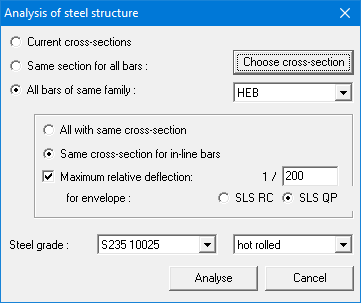
- During the first design, it’s best to use the option ‘All bars of same family’ and select the relevant family from the pull down list. By doing this, 1•2•Build is free to choose the most optimal cross-section within the selected family.
- The dialogue also allows you to define the maximum allowed relative deflection, based on an SLS RC or QP envelope combination. If no cross-section can be found that is sufficient, 1•2•Build will give a warning.
You can deviate anytime from the proposal that 1•2•Build has made. You can, for example:
- Select the relevant bar(s).
- Restart the design by clicking on .
- Select the option ‘Same section for all bars’ and click on the button ‘Choose cross section’. You’ll get access to the library below:

- In the first column you select the family of the cross-section and in the second column the relevant cross-section.
- Hit ‘OK’. 1•2•Build will perform the design again for the cross-section you’ve chosen.
