
A distributed or trapezium load can be applied according to the global coordinate system or according to the local coordinate system of the bars.
To apply the load:
- Select the relevant bars and click on the button
 . The following dialogue appears: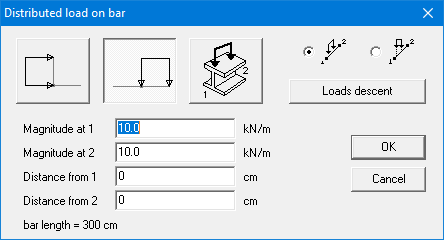
- Specify the direction of the loads. The direction of the arrows always indicates the positive direction of the load.
 load according to the global X-axis.
 load according to the global Y-axis.
 load perpendicular to the axis of the bar. If you adjust the inclination of the bar, the orientation of the load will also adjust.
- Enter the start and end value of the load.
When you change the start value of the load, the second value will automatically follow, resulting in a uniformly distributed load. When you change the end value, the start value will remain unchanged, resulting in a trapezium load.
With the option active, the entered magnitudes are considered per unit of bar length measured along the bar axis.
With the option active, the entered magnitudes are considered per unit of bar length measured along horizontal projection of the bar axis. The magnitude per unit bar length will thus increase as the inclination of the bar axis increases.
 - Enter the starting and ending point of the load in relation to the start and end point of the bar. The start point of a bar, is always the point with the smallest x-coordinate, or if the x-coordinates are equal, the smallest y-coordinate.
The magnitude of the concentrated loads and moments can be defined by entering the appropriate numerical values or can be calculated by 1•2•Build using the Load descent-function.
