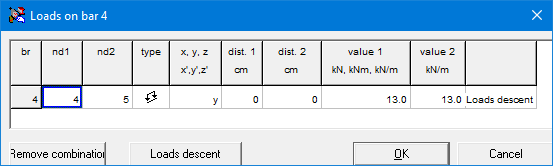
Calculating the value of a concentrated or distributed load can be simplified by using the load descent function. This function is called via the button  , which is available in the dialogs for the definition of concentrated and distributed loads.
This will give you access to the following list of material properties:
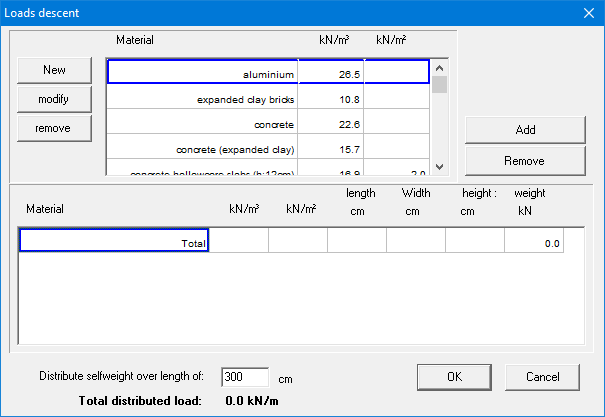
Double click the material you wish to add to the abacus. Or select the material and click on the button  . You can delete a material that has already been included in the abacus by selecting it and then clicking the button
  .
.
Once you have included a material in the abacus, you must indicate over which surface (length and width) this material is applied. If necessary, a thickness must also be specified. Based on this, the total weight can be calculated that should eventually be transferred to the bars you selected earlier.
If a desired material is not available in the list, the user can add a new material using the button  .
.
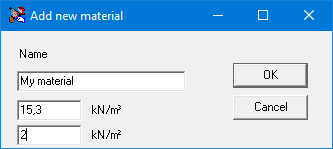
Click ‘OK’ to add the new material in the list. This also saves the completed list. The newly entered material is then selected so that it can be immediately added to the abacus.
If you use the load descent function to define a distributed load, you only need to enter the length over which the load is distributed. For convenience, 1•2•Build has already filled in the total span for you. If you had selected several spans simultaneously, 1•2•Build enters the length of the last span here. In that case, you must associate the column “Length” from the abacus with this span.
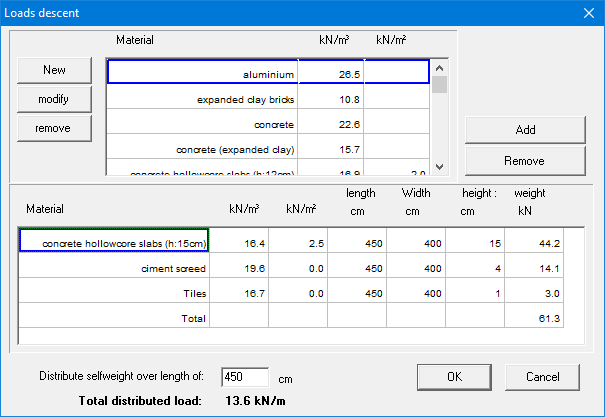
Confirm your definitions with ‘OK’, and the calculated load (either a distributed load or a concentrated load) appears automatically in the input fields of the load dialogs.
The composition of the load is stored with the relevant bar elements and can be included in a calculation note.
Once loads have been defined on a bar using the load descent function, changes can still be made. To do this, select the desired bar and double click to obtain an overview of the loads that have been applied to it.
In the overview that appears, you cannot directly adjust the values of the loads. However, via the button you regain access to the load descent function and adjust the existing definitions.