
How do add haunches?
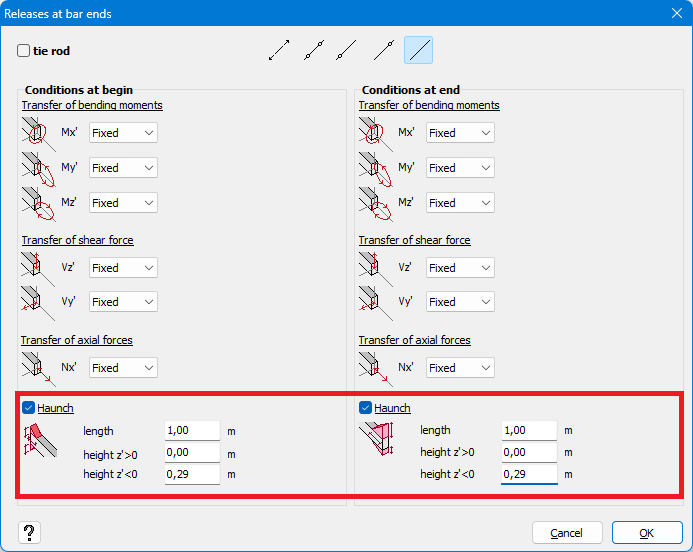
- Select the bar(s) on which you want to apply the haunch.
- Click on
 .
. - You can add haunches at the the begin and/or end point of the selected bars.
Check the box(es) before the relevant options. - Enter the length of the haunch.
A haunch usually starts at the length of 1m. - Enter the height of the haunch.
A good starting point is to set the height haunch equal to the height of the beam above. For example: a haunch below an IPE 300 gets a height of 0,29m.
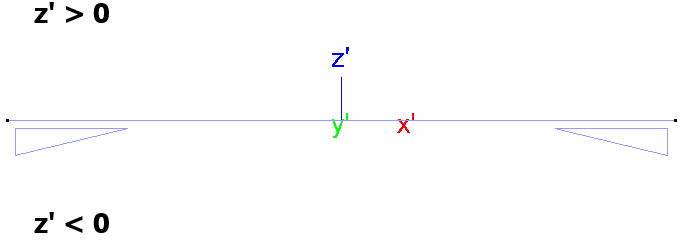
“Height z’ < 0” refers to the lower side of the beam. And “Height z’ > 0” refer to the upper side of the beam.
z’ is local coordinate system of the beam. It can be shown on the screen using the Configuration settings .
.
How are haunches taken into account in the calculations?
- The cross-section of the haunch equals the cross-section of the beam above it, minus the top flange.
It is not possibel to change the cross-section of the haunch in Diamonds. That’s only possible in PowerConnect (see further). - A haunch will locally increase the stiffness of the cross section (moment of interia) for the global analysis
 .
. - The position of the bolts, end plate, welds, … are irrelevant for Diamonds. Same for a detailed choice of the cross-section of the haunch. The purpose of a haunch in Diamonds is to calculate with the additional stiffness that results from the haunch. Not to perform a detailed calculation of the connection itself.
Once the structure is designed (= sufficient for strenght, stability and stiffness), you can send the connection to PowerConnect. In PowerConnect you can adjust the cross-section, bolts, end plate, … If you change the cross-section of the haunch in PowerConnect, send the connection back to Diamonds, the global analysis in Diamonds, will be made with the adjusted cross-section.
