
This article explains how to send one or more PowerConnect connections to Tekla Structures, using BIM Expert.
1. Preparation in PowerConnect
Make sure the model is calculated and that elastic results are available.
2. Send the PowerConnect model to Tekla Sturctures
2.1 From PowerConnect to BIM Expert
In the File menu tab, select ‘Export > Export to BIM Expert’ or simply use F8.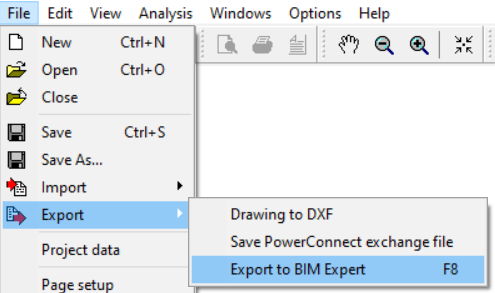 The (physical) connection models will sent to BIM Expert. All sections, material, stiffeners, bolts and welds are automatically converted and transferred. The connections are now in BIM Expert.
2.2 From BIM Expert to Tekla Structures
3. Final steps in Tekla Structures
You will see the already defined connections.
