
To get an overview of the available licenses on your dongle
[CodeMeter 6.20 or newer]
- Start CodeMeter Control Centre ( Start > All Programs > CodeMeter > CodeMeter Control Centre or click on
 ).
). - Click on ‘WebAdmin’. An internet page will open.
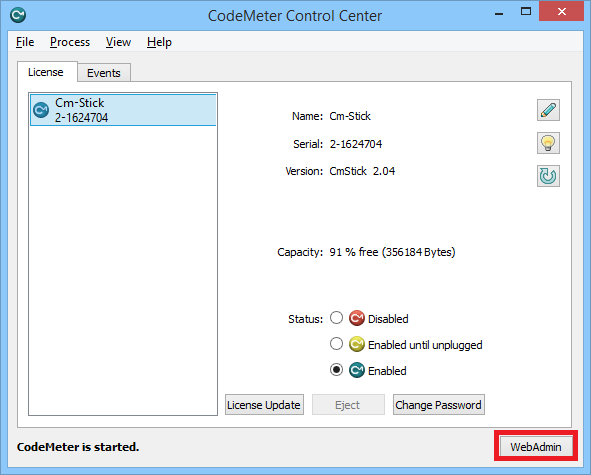
- Retrieve the CodeMeter dongle
- If the CodeMeter dongle is local on your computer
Go to Container > All container > pick the relevant CodeMeter dongle.
- If the CodeMeter dongle is on a server on the network.
- Click on ‘Localhost’ at the bottom of the window.
- Select the server from the list and hit ‘Apply’.

- Go to Container > All container > pick the relevant CodeMeter dongle.
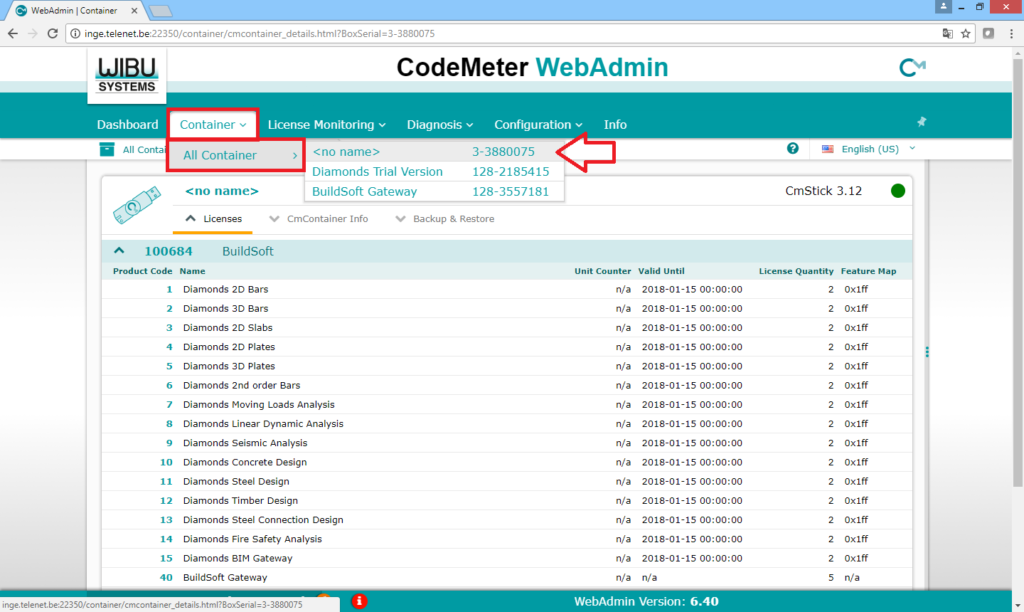
- If the CodeMeter dongle is local on your computer
- You’ll get an overview of the modules (‘Name’) present you the selected dongle, the expiration date (if relevant) (‘Expiration time’), the number of licenses for each module (‘License Quantity’) and the version (‘Feature Map’).
