
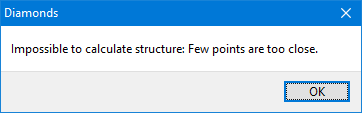
When starting the elastic analysis  , Diamonds gives the error
Solution
- This message is shown because there are points closer too eachother than a defined tolerance.
The tolerance can be defined in the menu Options > Preferences > Tab page ‘Model’. - Click on ‘OK’ until the message is gone.
Diamonds will automatically select the points that are too close to one another. So make sure not to click in the drawing area! - If cannot see the points between the rest of the elements in your model, click on
 . This hides everything, besides the selected points. Use the button
 to center the points on the screen. If you cannot zoom in, read this article.
 - Use the data table
 , the translation function
  or the projection function
  (recommended) to merge the points.
Do not use the Model verification .
.
